one thing me n my art loving gf would do is visit galleries and play a game called “root, loot or boot”
the gist is that you would look at a group of paintings in a room and decide which figure in the painting you’d root (fuck, in Australian slang), which painting you’d loot (steal and put on your wall at home) and which painting you’d boot (punt into the garbage because it’s shit and Not Art)
a couple of things about my experiences:
1. this game is a lot more fun if you’re attracted to women because there’s so many Hot Gals to choose from
2. if you are attracted to men, you will spend a lot of time going “well, looks like I’ll have to pick jesus again” as my bi gf did
3. it gets more complicated in modern art museums and you find yourself having saying, “I’d fuck the rhombus” “you CAN’T fuck the rhombus” “then I’ll fuck that blue squiggle thing. what’s it called?” “creeping existential dread in blue” “then does that mean I’m fucking the squiggle or am I getting fucked by the existential dread it represents?” “aren’t we all already getting fucked by existential dread?”
4. if you play this with an art history nerd, they may decide to kill you over one of your “boot” choices
5. you will get Disapproving Looks from other patrons who overhear your heated debates
6. it’s also the best fun you’ll ever have in an art gallery
It’s for a group on Deviantart I’m modding. I had a fun setting up the charts and adding the information. I always love wings so I wanted to do something with it for fun. The top picture is what I aesthetically enjoy, haha. I was inspired by Haibane-Renmei on the process.
so the balloon tool in csp lets u create speech bubbles v easily. by default, its grouped w the text tool? but personally ive moved the text tool out of the group
anyway, it’s a neat tool bc it uses the same settings as the brush tool so you can match your settings & have it match your strokes
like, try 2 guess which bubbles the brush tool n which ones the balloon pen!
the first one’s the balloon tool & the second one’s the brush tool.
bc its a vector, u can manually adjust the shape of the bubble
for that you want to switch to the correct line tool,
pinch vector line is the best fr making adjustments
with the control point tool you can make adjustments to the stroke
it also groups yr text with the bubble so if you want to move the bubble it’ll also move the text
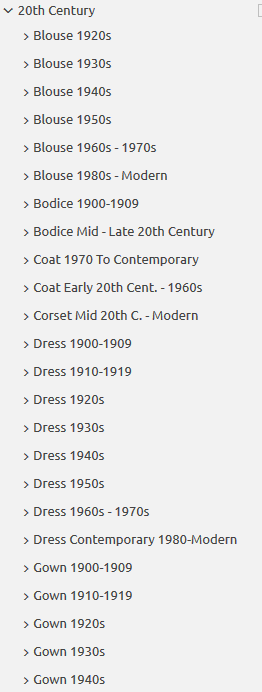
Do you design a lot of characters living in not-modern eras and you’re tired of combing through google for the perfect outfit references? Well I got good news for you kiddo, this website has you covered! Originally @modmad made a post about it, but her link stopped working and I managed to fix it, so here’s a new post. Basically, this is a costume rental website for plays and stage shows and what not, they have outfits for several different decades from medieval to the 1980s. LOOK AT THIS SELECTION:
OPEN ANY CATEGORY AND OH LORDY–
There’s a lot of really specific stuff in here, I design a lot of 1930s characters for my ask blog and with more chapters on the way for the game it belongs to I’m gonna be designing more, and this website is going to be an invaluable reference. I hope this can be useful to my other fellow artists as well! 🙂
this is by no means a comprehensive guide and just covers the most basic structure that i’ve observed. But it was fun to make. Simple styles may look easy but are actually pretty challenging so make it look good xux
yo here’s a useful tip from your fellow art ho cynellis… use google sketchup to create a model of the room/building/town you’re trying to draw… then take a screenshot & use it as a reference! It’s simple & fun!
Sketchup is incredibly helpful. I can’t recommend it enough.
There’s a 3D model warehouse where you can download all kinds of stuff so you don’t have to build everything from scratch.
reblog to save a life
This is an incomplete tutorial, and it drives me crazy every
time I see it come around.
We live in a pretty great digital age and we have access to
a ton of amazing tools that artists in past generations couldn’t even dream of,
but a lot of people look at a cool trick and only learn half of the process of
using it.
Here’s the missing part of this tutorial:
How do you populate your backgrounds?
Well, here’s the answer:
If the focus is the environment, you must show a person in relation to
that environment.
The examples above are great because they show how to use the
software itself, but each one just kind of “plops” the character in front of
their finished product with no regard of the person’s relation to their
environment.
How do you fix this?
Well, here’s the simplest solution:
This is a popular trick used by professional storyboard and
comic artists alike when they’re quickly planning compositions. It’s simple and
it requires you to do some planning before you sit down to crank out that
polished, final version of your work, but it will be the difference between a background
and an environment.
Even if your draftsmanship isn’t that great (like mine),
people can be more immersed in the story you tell if you just make it feel like
there is a world that exists completely separate from the one in which they
currently reside – not just making a backdrop the characters stand in front of.
Your creations live in a unique world, and it is as much a character as
any other member of the cast. Make it as believable as they are.
Great comments and tutorials!
I’m a 3d artist and have been exploring the possibilities of using 3d as reference for 2d poses. I want to add a couple of tips and things!
Sketchup is very useful for environment references, and I assume it’s reasonably easy to learn. If you’re interested in going above and beyond, I highly recommend learning a proper 3d modeling program to help with art, especially because you can very easily populate a scene or location with characters!
Using 3ds Max I can pretty quickly construct an environment for reference. But going beyond that, I can also pose a pretty simple ‘CAT’ armature (known in 3d as a rig) straight into the scene, which can be totally customized, from various limbs, tails, wings, whatever, to proportions, and also can be modeled onto and expanded upon (for an example, you could 3d sculpt a head reference for your character and then attach it to the CAT rig, so you have a reference for complex face angles!)
The armature can also be posed incredibly easily. I know programs exist for stuff like this – Manga Studio, Design Doll – but posing characters in these programs is always an exercise in frustration and very fiddly imo. A simple 3d rig is impossibly easy to pose.
By creating an environment and dropping my character rig into it, I have an excellent point of reference when it comes to drawing the scene!
Not only that, but I can also view the scene from whatever angle I could ever want or need, including the character and their pose/position relative to the environment.
We can even quickly and easily expand this scene to include more characters!
Proper 3d modeling software is immensely powerful, and if you wanted to, you could model a complex environment that occurs regularly in your comic or illustration work (say, a castle interior, or an outdoor forest environment) and populate the scene with as many perspective-grounded characters as you need!





 Procrastination Queen