art-res:

sully-s:

Other things to consider

You don’t always have to draw the harsh light line if you just want a soft scene. You can just use the ‘bounce’as the light source.

You can also transform the harsh light line layer to any layer mode options your art program allows.

Feel free to experiment. Also, it takes time and experience to learn the quantities of line thickness, opacity you want of your light layers. So if you find yourself getting frustrated that your work looks nothing like mine don’t worry you’ll get there 🙂

Really nice explanation of lighting!

Attention ALL artists!

miss-lillipants:

swevenfox:

infinipede:

sheodraws:

You sure have seen this post. It has spread like wildfire over the past few days so I doubt there is any artist out there who hasn’t seen it. But even if you didn’t, you should read on because I’m about to tell you a handy little thing that can help you to protect your art from such assholes as the anon who submitted this bullcrap, as well as art thieves in general.

The magic word is Metadata.

Metadata is like an invisible signature that is embeded into a file. It can contain all kinds of information, like Title, date, keywords for online seach engines, and copyright information. And the best thing is, since this information is “hidden” in the code of your picture, it’s hard to remove it.

There is a nice basic tutorial on how to add Metadata, or “additional file information” to your images in photoshop. It’s really, really easy so check it out!

“Adding Your Contact And Copyright Info To Your Photos With Photoshop” on PhotoshopEssentials.com

I’m not sure if you can do the same with any other art program. If you know how to do this in other programs / can confirm that it works the same way there, please tell me so I can add the information to this post.

Adding the Metadata will not stop idiots from taking and reposting your art. It also won’t make them stop editing out your signature. It WILL however, help you prove that you are the original artist whenever you have to.
Always remember my friends. You, the artist, are protected by law. No one has the right to take your intellectual property and hard work and repost, use or edit it without your permission. Ever.

art thief: well how can you prove its yours??

me: /opens metadata

I spread the word as it is important to all artist who ever suffered from art thieving or so.
You guys, metadata is super important, you guys. In an everday and legal sense. People legitimately look at and rely on metadata to know the basic, but important bits of information about a digital product (paintings, photographs, exe files, etc.), ESPECIALLY the source.

Don’t underestimate it!

shading colour tips

nocturnenebula:

bravestghost:

hey yall its me the Art Mom™ to help you shade pretty

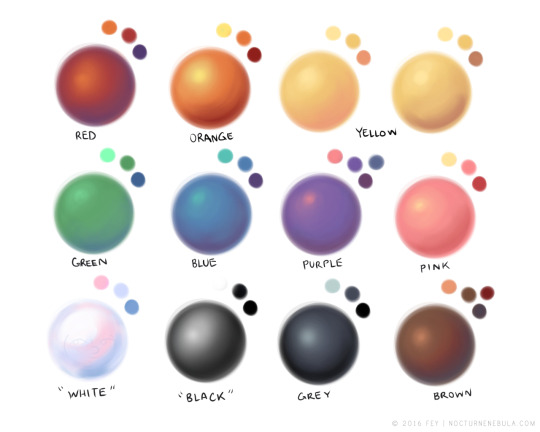
rule 1: DO NOT SHADE WITH BLACK. EVER. IT NEVER LOOKS GOOD. 

  • red– shade with a slightly darker shade of purple
  • orange– slightly darker and more saturated shade of red
  • yellow– i think like..a peach could work but make it a really light peach
  • green– shade with darker and less saturated shade of blue or teal
  • blue– shade with purple
  • purple– a shade thats darker than the purple you’re using and maybe a little pink (MAYBE blue)
  • pink– darker shade of red
  • white– a really light lavender or blue..or i guess any really light colour??
  • black– okay listen dont use pure black to colour anything unless you want to leave it with flat colours because you cant really shade black lol
  • grey– a slightly darker shade of purple or blue (less saturated)
  • brown– slightly darker and less saturated shade of purple or red

aaaaand thats all i got lol. let me know if there is anything i should add to this list!!

If you’re a visual learner…

I made some Balls of Colour to go with Art Mom™’s post: